# Yamaha RCP Channel Level Variable
**URL:** https://discourse.checkcheckonetwo.com/t/yamaha-rcp-channel-level-variable/3365
**Category:** Yamaha RCP Module
**Created:** [November 12, 2022, 2:21am UTC](https://discourse.checkcheckonetwo.com/t/yamaha-rcp-channel-level-variable/3365 "2022-11-12T02:21:59Z")
**Posts on this page:** 6
**Page:** 1
### Author:  [@landinhull](https://discourse.checkcheckonetwo.com/u/landinhull)
#### Post date: [November 12, 2022, 2:22am UTC](https://discourse.checkcheckonetwo.com/t/yamaha-rcp-channel-level-variable/3365/1 "2022-11-12T02:22:00Z")
Is there a way to get the level of a channel to display as the text of a button? I specifically would like to see the level of a channel in a specific aux.
---
### Author:  [@Andy](https://discourse.checkcheckonetwo.com/u/Andy)
#### Post date: [November 12, 2022, 3:34pm UTC](https://discourse.checkcheckonetwo.com/t/yamaha-rcp-channel-level-variable/3365/2 "2022-11-12T15:34:03Z")
Welcome, @landinhull!
It’s very easy with the latest build from [here](https://discourse.checkcheckonetwo.com/t/custom-companion-build-for-yamaha-and-a-h/2248).
The steps are:
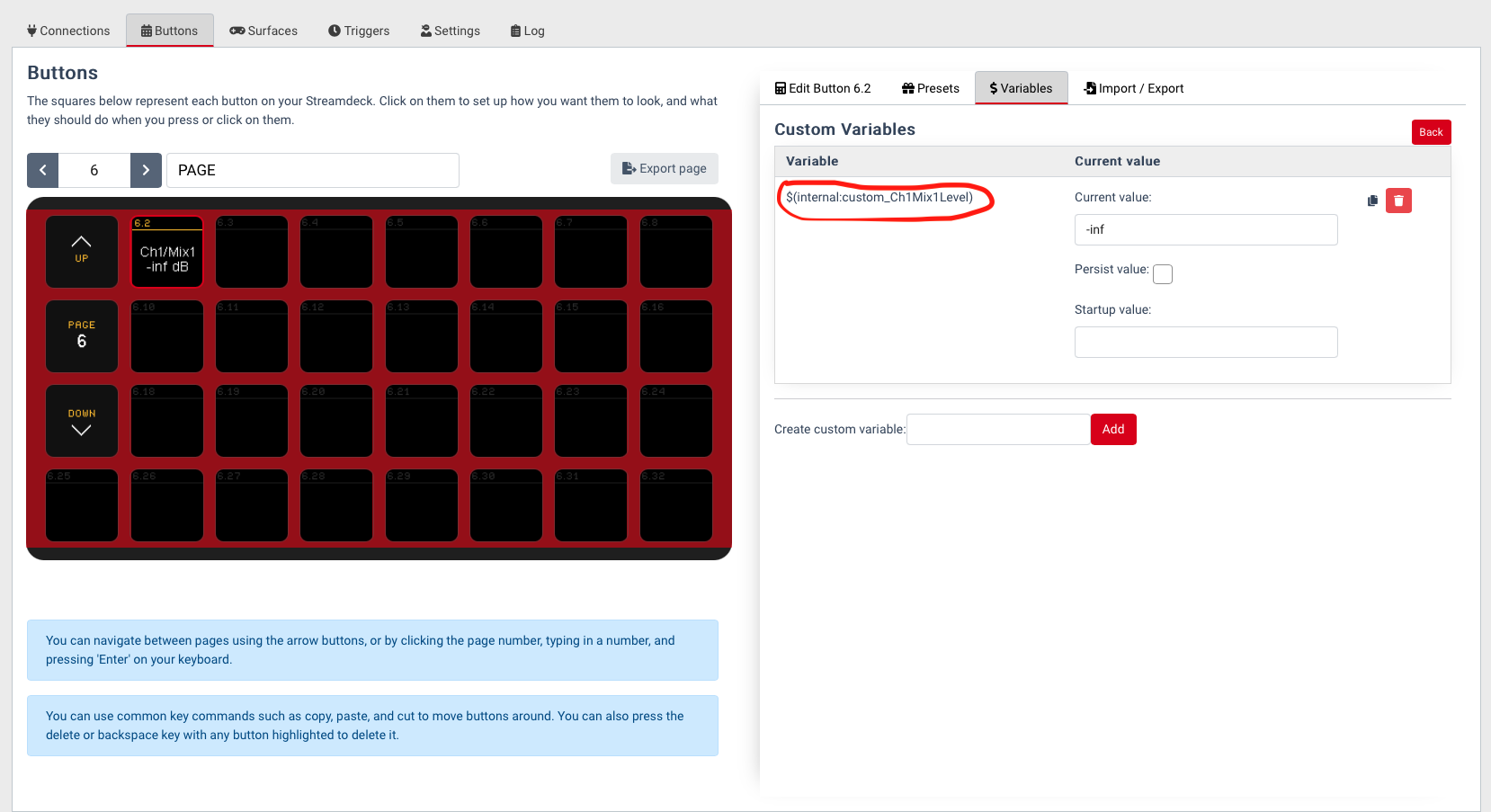
1. Create a custom variable to hold the mix send level
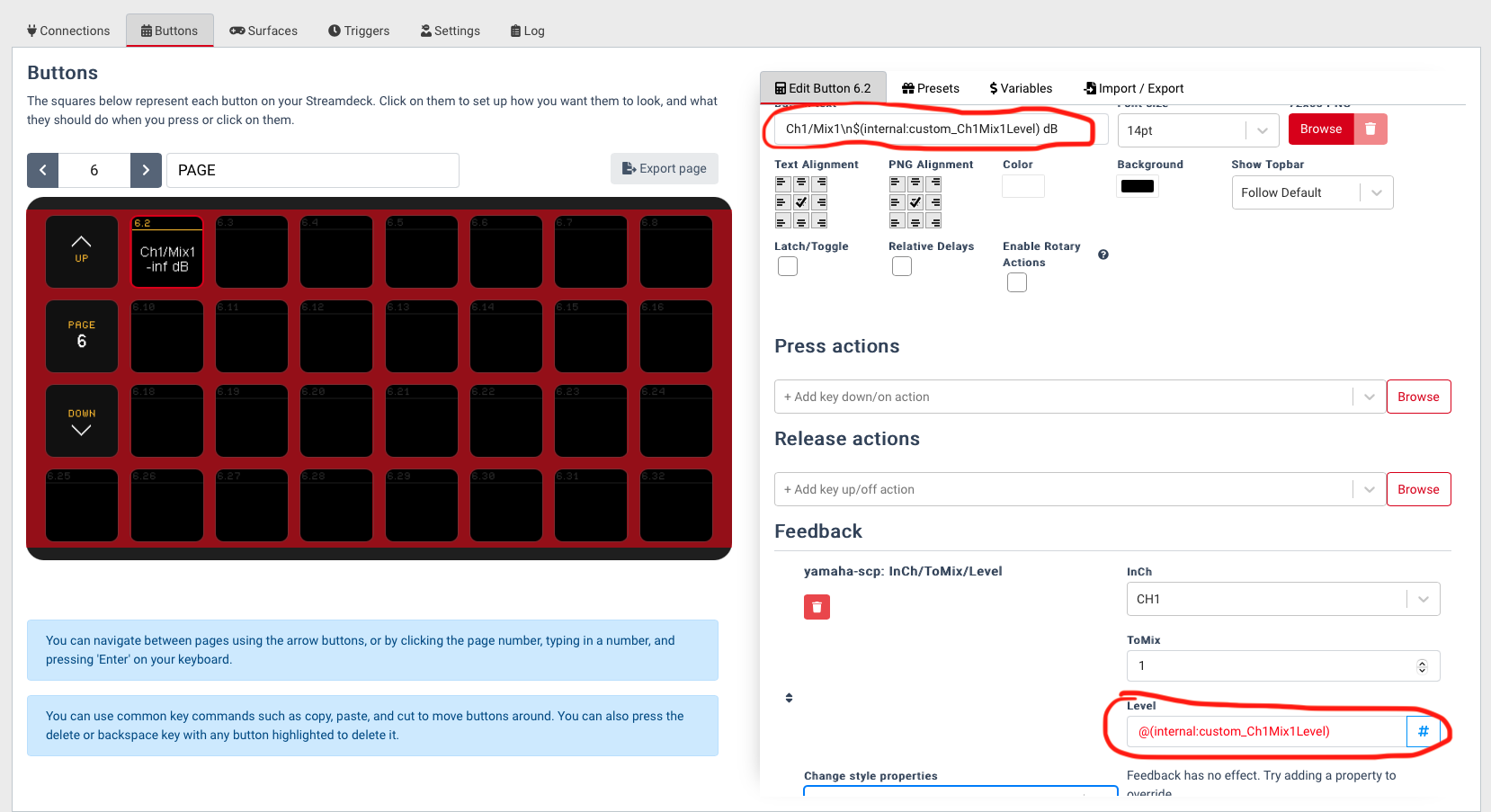
2. Create a feedback for the button using the `@(internal:custom_)` format to set the value. No other feedback parameters are needed (button colors, etc.) Click the `$` beside any value that uses a numeric spinner to change it to `#` which allows you to type the text.
3. Add the variable into the button text using the `$(internal:custom_)` format to show the value.
See here for what the button and variable settings look like.
---
### Author:  [@Andy](https://discourse.checkcheckonetwo.com/u/Andy)
#### Post date: [November 12, 2022, 3:42pm UTC](https://discourse.checkcheckonetwo.com/t/yamaha-rcp-channel-level-variable/3365/3 "2022-11-12T15:42:07Z")
---
### Author:  [@landinhull](https://discourse.checkcheckonetwo.com/u/landinhull)
#### Post date: [November 12, 2022, 5:52pm UTC](https://discourse.checkcheckonetwo.com/t/yamaha-rcp-channel-level-variable/3365/4 "2022-11-12T17:52:15Z")
@Andy,
This looks great! I am struggling being able to type text into the feedback level. I don’t have the option button between $ and #. Is there something I need to do to get that button to show up? I am on version 2.4.0 on MacOS.
Thanks!
---
### Author:  [@Andy](https://discourse.checkcheckonetwo.com/u/Andy)
#### Post date: [November 12, 2022, 7:47pm UTC](https://discourse.checkcheckonetwo.com/t/yamaha-rcp-channel-level-variable/3365/5 "2022-11-12T19:47:19Z")
Download the build from [here](https://discourse.checkcheckonetwo.com/t/latest-companion-build/2281).
---
### Author:  [@landinhull](https://discourse.checkcheckonetwo.com/u/landinhull)
#### Post date: [November 15, 2022, 5:24am UTC](https://discourse.checkcheckonetwo.com/t/yamaha-rcp-channel-level-variable/3365/6 "2022-11-15T05:24:27Z")
I was able to test this out on sunday and everything worked out great. Thanks so much for helping me out on this!