Generic-midi Module - Midi Button with 2-way Synch

I am trying to create Companion buttons to (sort of) emulate midi fader behaviour, i.e for a given cc, create 2 buttons, the top button will increase the cc value by a small increment for each press, and the bottom decrease the cc value.

I am using Windows 11, and have Companion v5.0.2, and generic-midi module v1.4.0. I am technical with experience of scripting and creating midi surface controller pages on apps such as TouchOSC, but I am certainly no expert. Within Companion, I can create midi buttons to send midi note, pc, or cc messages to a stand alone VST or Reaper running on the same PC via a loopMidi virtual midi port, so my basic setup and basic understanding is ok.

For the fader emulation, I have created a test button for cc7 (volume), defined a variable with a start value of, for example 64, and configured the button to add 2 each time it is pressed then to send the updated cc7 value to the receiving VST synth and to displays the cc value on the button itself. So far so good, and it works as described.

However, this obviously causes jumps on the VST instrument, and instead of defining a start value, I need to read the current cc value from the VST synth. My questions are

  1. How do I best read the current version to set the start value,
  2. If possible, can I update the Companion button display if the cc value is changed directly on the VST instrument (i.e. 2-way synch). If so, how?

I’m sure this is achievable as TouchOSC can do this as long it has matching input/output midi ports, and that other devices such as those with motorised faders, or LED indicators on the 16knob Midi Fighter Twister can stay in sync.

I’m struggling to find any more detailed information, any links to help, thoughts, advice, or guidance would be appreciated

Thanks
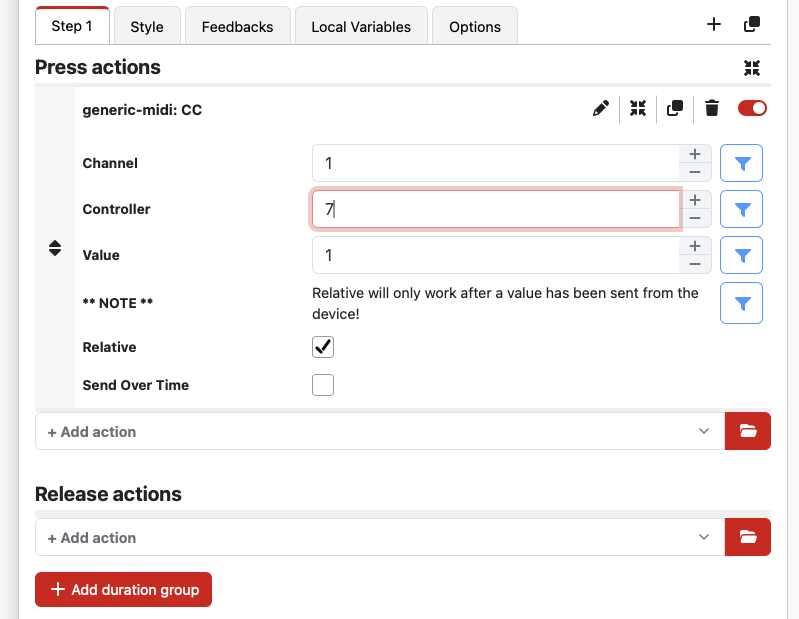
Did you try checking the “relative” checkbox in the action?

But, like the NOTE shows, your device needs to send it’s current value. If, as you say, it works in TouchOSC, it should work here.
You can check the module log to make sure you’re actually receiving MIDI from your device.

Resolved, and working (with minor caveats)

(I should, and do know this, but forgot) Midi 1.0 is uni-directional so for two way synch you need to set a separate reverse path, and make sure the receiving VST will send Midi messages in response to local knob or fader changes (many don’t) which can then be read to a Companion variable. I resolved this in my Reaper use-case using the excellent ReaLearn which allows me to link to any VST parameter and work with both send and receive midi.

As Midi 1.0 is uni-directional, there is no midi command to request a current value and sync won’t happen until one of the ends is changed and the other end reads the value and sets itself accordingly. If the VST is changed first, Companion can simply read the midi value and set itself to the same value (desired result). If Companion button is changed first it will send its start value and work from that point which can cause an undesirable jump in the VST value, but another advantage of ReaLearn is that it support ‘soft takeover’ and won’t change the VST value if wildly different preventing the jump.

In my particular use-case, if Companion is started before the Reaper project is loaded, it looks like Reaper/ReaLearn will send out the CC values on project startup which Companion can read as the start value, so sync is imediates and it pretty much works seamlessly

(In fact ReaLearm actually offers a lot of functionality which would allow the Companion button to be a simple momentary push button, and all the logic for incremental updates to emulate fader to be within ReaLearm, but that is a different exercise, and in my case I wanted to understand how Companion and Companion variables worked.

Midi 2.0 will eventually provide a resolution as it is bidirectional and supports process inquiry and property exchange, but that is still a long way from main stream.

I would be interested in any other views

If you just use the relative mode as I showed, you shouldn’t need to do all that.
If the MIDI module doesn’t have the current value for a control that’s set to “relative”, it won’t change the value, which stops you from getting that “jump” issue you were having.

Agreed it does simplify things; I appreciate the help and am very happy with what I can do now .

Again, I am sure everyone else knows this but I’m new to Bitfocus Companion, I have now also included a vertical bar (gauge) to display the level on a button, and in fact split it over the two buttons (up, and down) and discovered that I can use the ‘While True’ loop to auto-repeat a button if held down which is great for emulating faders.

The new layered graphics formatting of buttons in Companion v5.0 also mean I can create attractive and flexible buttons with great feedback options. All in all, I am very impressed with the combination of the generic-midi module and Companion.

1 Like

Yes the graphics are amazing. The meters I’ve made for the DM module are just my first attempt and I can immediately see the power in them.
The other meters and graphics I’ve done need to be updated for v5 too.